Risk-Based Test Planner
Section: Test Planning · Page: /risk-planner
Purpose#
The Risk-Based Test Planner helps you decide where to spend limited testing time. You list the areas in scope for a sprint or release and score each one on a few simple factors. The planner works out a risk level and a test depth for each area, and splits your available hours between them, so the riskiest areas get the most attention.
Risk-based testing means testing the parts most likely to break, and most costly if they do, first and deepest.
The problem it solves#
Before: test effort is shared out by gut feeling or by whoever shouts loudest. Low-risk areas get as much time as critical ones, the riskiest change is tested on the last afternoon, and nobody writes down what was deliberately left out.
After: every area gets a visible score with a written method behind it, a recommended depth and an hour budget that adds up to your capacity. Areas you choose not to test are listed as accepted risks, with a reason everyone can see.
Who should use it and when#
- QA leads — at sprint or release planning, to agree test priorities and effort with the team.
- QA engineers — before testing starts, to know which areas need full negative and edge-case coverage and which need only a smoke check.
- Managers and product owners — to understand and sign off what will not be tested this time.
Key features#
- New Plan with dates, Available testing hours, optional testers, an optional linked Release and a Start from choice:
- Blank
- Duplicate a previous plan
- Import areas from Bug Tracker feature pages
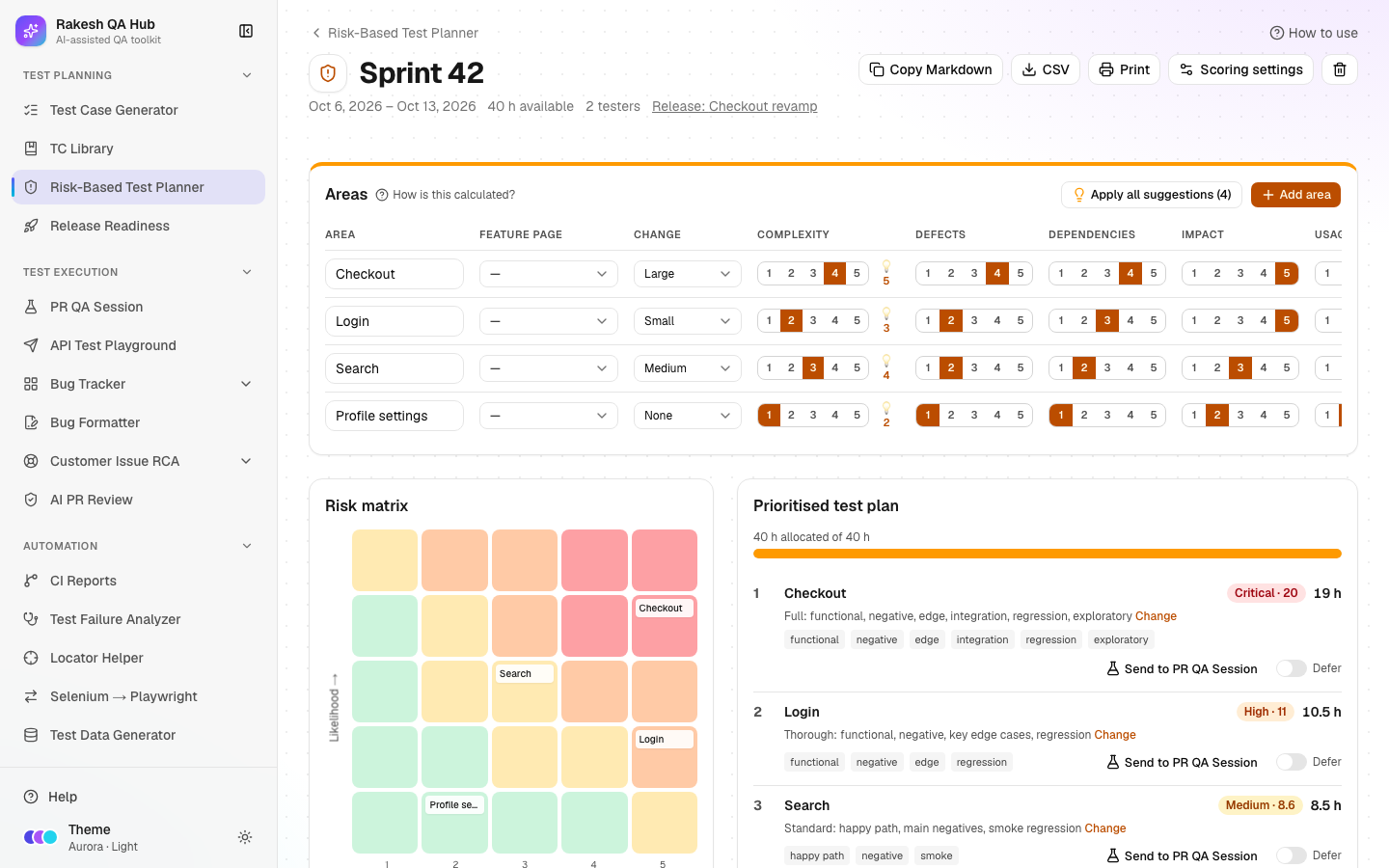
- An Areas table scored from 1 to 5 on Complexity, Defects (defect history), Dependencies, Impact (business impact) and Usage, plus Change (change size: None, Small, Medium, Large, New feature).
- An automatic Risk score and level (Critical, High, Medium, Low) and Hours, saved as you type ("Saving…" / "Saved").
- 💡 suggestions from Bug Tracker (defect history) and AI PR Review (complexity), never applied without your click. Apply all suggestions takes them all.
- A Risk matrix (likelihood × impact heat map) and a Prioritised test plan with test depth and hours.
- Defer an area with a reason so it moves to Accepted risks (out of scope / deferred). Bring back restores it.
- Scoring settings for one plan: change-size scores, weights, level thresholds and depth text.
- Exports: Copy Markdown, CSV, Print, and Send to PR QA Session.
How to use it#
- Open Risk-Based Test Planner from the Test Planning section of the sidebar.
- Click New Plan. Fill Name (e.g. "Sprint 42"), Start date, End date and Available testing hours. Optionally pick a Release and add Notes.
- Under Start from, choose Blank, Duplicate a previous plan, or Import areas from Bug Tracker feature pages. Then click Create.
- On the plan page, click Add area for each feature or area in scope and type its name. You can link a Feature page to get defect suggestions.
- Score each area: pick Change, then set Complexity, Defects, Dependencies, Impact and Usage from 1 (low) to 5 (high). The Risk and Hours columns update straight away.
- If 💡 suggestions appear, read their reasons and accept them one at a time or click Apply all suggestions.
- Optional: type a fixed number in an area's Hours field to override the automatic split. Leave it empty to allocate automatically.
- Read the Risk matrix and the Prioritised test plan. To leave an area out, click Defer, give a Reason, and confirm.
- Share the plan with Copy Markdown, CSV or Print, or click Send to PR QA Session to carry the riskiest factors into a session prompt.
Worked example#
Sprint 42 has 40 testing hours and four areas:
| Area | Change | Complexity | Defects | Dependencies | Impact | Usage |
|---|---|---|---|---|---|---|
| Checkout | Large | 4 | 4 | 4 | 5 | 5 |
| Login | Small | 2 | 2 | 3 | 5 | 5 |
| Search | Medium | 3 | 2 | 2 | 3 | 4 |
| Profile settings | None | 1 | 1 | 1 | 2 | 2 |
The planner gives:
- Checkout — score about 20 → Critical, Full depth, the largest share of hours.
- Login — High, Thorough depth.
- Search — Medium, Standard depth.
- Profile settings — Low, Light depth (smoke only).
You defer Profile settings with the reason "Not changed this sprint; covered by automation". Its hours are shared out among the other three, and it appears under Accepted risks.
Understanding the output#
- Likelihood (1–5) — a weighted average of Change (30%), Complexity (25%), Defects (30%) and Dependencies (15%).
- Impact (1–5) — a weighted average of business impact (70%) and usage (30%).
- Risk score — Likelihood × Impact, from 1 to 25.
- Levels — Critical 16 or more, High 10–15.9, Medium 5–9.9, Low below 5.
- Test depth by level:
- Critical — Full: functional, negative, edge, integration, regression and exploratory.
- High — Thorough: functional, negative, key edge cases and regression.
- Medium — Standard: happy path, main negatives and smoke regression.
- Low — Light: smoke / sanity only.
- Hours are split in proportion to risk score. Every area gets at least 0.5 h, values are rounded to 0.5 h, and the total matches your capacity. Deferred areas get 0.
- Risk matrix — each cell is a likelihood/impact pair. Chips in a cell are areas, and clicking a chip scrolls to its row. Darker, warmer cells are riskier.
- Click How is this calculated? to see this explanation on the page.
Tips and best practices#
- Score as a team in a 15-minute session. Agreement on the numbers matters more than precision.
- Link Bug Tracker feature pages so defect history comes from real data, not memory.
- Always give a reason when you Defer. It becomes your written record of accepted risk.
- Leave Hours on automatic unless you have a fixed commitment, such as a contractual UAT slot.
- Use Duplicate a previous plan each sprint and only re-score the areas that changed.
Limitations and things to know#
- Defect suggestions count valid issues from the last 90 days, with P0/P1 issues counted twice. They need linked feature pages.
- Complexity suggestions use AI PR Review flags from the last 30 days on the linked release's repos, so the plan needs a linked release.
- Scoring settings apply to one plan only. Reset to defaults restores the standard weights.
- Deleting an area or a plan needs the admin passcode.
- The score guides decisions; it doesn't replace judgement. An area with a known customer escalation may deserve more time than its score suggests.
Works well with#
- Bug Tracker — import areas from feature pages and get defect-history suggestions.
- AI PR Review — P0/P1 flags raise complexity suggestions.
- PR QA Session — Send to PR QA Session turns the top risk factors into focus areas:
- dependencies → Contract Testing
- size and complexity → UI / UX
- top business impact → Security
- usage → Performance
- defects → Regression
- Release Readiness — link the plan to a release, and record deferred areas as known issues there.
- Test Case Generator — match each area's depth to Quick, Standard or Exhaustive.
FAQ#
What's the difference between likelihood and impact? Likelihood is how probable a bug is (how much changed, how complex it is). Impact is how bad a bug would be (business value, how many users touch it).
Can I change the thresholds or weights? Yes. Open Scoring settings on the plan, change them and click Save settings. Only this plan is affected.
Why didn't my area get exactly the hours I expected? Hours are rounded to 0.5 h and every area gets at least 0.5 h, so small areas round up and the largest areas absorb the difference.
Does deferring delete the area? No. It moves to Accepted risks with your reason. Click Bring back to restore it.